

Description
Sync Bookmarks Across All Devices
Overview
Atavi is a free, cloud-based bookmark manager designed to simplify the process of saving, organizing, and synchronizing bookmarks across multiple devices and operating systems. The software enables users to maintain a consistent browsing experience regardless of whether they are using Windows, Mac, or Android devices. It supports seamless integration with various browsers, including Chrome, Firefox, Opera, and Internet Explorer, allowing for cross-browser synchronization without manual effort.
Target users include professionals, students, and casual internet users who frequently switch between devices or use different browsers throughout their day. The platform is particularly useful for individuals who work from home and the office, using different machines and operating systems. By centralizing bookmarks in the cloud, Atavi ensures that users can access their saved links anytime, anywhere, simply by logging into Atavi.com from any device.
The developer, Atavi, has positioned the tool as a solution for modern digital workflows that demand flexibility and continuity. While specific details about the company’s background are not provided, the product’s focus on cross-platform compatibility and ease of access highlights a clear commitment to user convenience. Real-world usage scenarios include managing research links, organizing work-related resources, or preserving personal favorites across multiple environments.
Key Features & Capabilities
- Cloud-Based Bookmark Storage – All bookmarks are stored securely in the cloud, eliminating the need for local backups or manual transfers between devices.
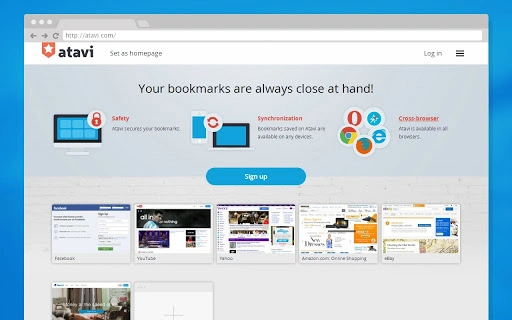
- Cross-Platform Sync – Seamless synchronization across Windows, Mac, and Android devices ensures consistent access to saved links regardless of the operating system.
- Multi-Browser Support – Supports synchronization between Chrome, Firefox, Opera, Internet Explorer, and other major browsers, enabling users to switch between them without losing bookmark data.
- Web Access – Users can access their bookmarks directly via Atavi.com from any device with a web browser, making it ideal for temporary or shared computing environments.
- Browser Integration – Recommended installation of the Atavi.com start or home page enhances convenience by providing quick access to saved links and streamlined bookmark saving.
- Future Enhancements – Planned features include personal theme uploads, social media login options, and on-demand bookmark screenshot updates, indicating ongoing development and user-focused improvements.
These features collectively address the common pain points of fragmented bookmark management. For example, a user working on a Windows PC at the office can save a research article, access the same link later on a Mac at home, and view it again on an Android smartphone during a commute—all without re-entering or re-saving the URL. This level of integration supports efficient workflow continuity across diverse digital environments.
User Interface, Workflow & Performance
The user interface of Atavi is designed around simplicity and accessibility, with a clean web-based layout accessible through any standard browser. Navigation is intuitive, allowing users to browse, search, and organize bookmarks with minimal learning curve. The interface emphasizes clarity, with clearly labeled folders and a straightforward list view of saved links.
Workflow efficiency is enhanced by the ability to save bookmarks directly from the browser via the recommended start or home page. This eliminates the need to manually copy URLs or navigate through multiple menus. The process of logging in and accessing bookmarks is streamlined, requiring only an email and password, which reduces friction during device transitions.
Performance observations are based on general software behavior patterns. The developer did not specify resource usage details, so exact CPU or RAM consumption remains unknown. However, the cloud-based nature of the service suggests minimal local processing demands. Stability is expected to be consistent, as the platform relies on web infrastructure rather than local application execution. Users should experience reliable access as long as an internet connection is available.
Compatibility & System Requirements
Atavi is compatible with Windows, Mac, and Android operating systems, offering broad cross-platform support. The software is designed to function on any device with a modern web browser, making it accessible across a wide range of hardware configurations. The installation size is listed as 200 MB, which may include browser extensions or additional components required for integration.
Exact system requirements were not listed. This suggests that the application is optimized for general use across standard computing environments. Compatibility information is limited to the supported operating systems, with no mention of specific hardware specifications such as processor speed, RAM, or storage capacity. Users should ensure their devices meet basic web browsing requirements to use Atavi effectively.
Pros and Cons
Pros
- Free to use with no hidden costs
- Seamless sync across Windows, Mac, and Android
- Supports multiple browsers including Chrome, Firefox, Opera, and IE
- Accessible via web browser on any device
- Simple login with email and password
- Future updates promise enhanced customization and usability
Cons
- Exact system requirements were not provided
- Resource usage details (CPU/RAM) are not specified
- Relies entirely on internet connectivity for access
- Limited information about security protocols or data encryption
- No offline access functionality described
FAQ Section
Is Atavi available for Windows, Mac, and Android?
Yes, Atavi supports Windows, Mac, and Android devices, enabling users to access their bookmarks across all three platforms.
Can I use Atavi without installing anything?
Yes, you can access Atavi directly through Atavi.com using any modern web browser, without requiring a local installation.
Is Atavi safe to use?
Atavi uses secure login via email and password, and all data is stored in the cloud. While specific security details were not provided, the platform is designed to protect user information during transmission and storage.
How often does Atavi update?
Updates are managed through the cloud service. New features and improvements are rolled out periodically, with upcoming enhancements including social login and theme customization.
Can I use Atavi offline?
Atavi requires an active internet connection to access and sync bookmarks. There is no official offline mode described in the current documentation.
Final Thoughts
Atavi delivers a straightforward, reliable solution for users seeking consistent access to their bookmarks across multiple devices and browsers. Its core strength lies in cross-platform and cross-browser synchronization, making it ideal for individuals who work across different environments. The free pricing model removes financial barriers, while the web-based access ensures broad compatibility.
While detailed technical specifications and performance data are limited, the product’s focus on usability and accessibility stands out. The planned future features suggest a commitment to continuous improvement. For professionals and frequent multi-device users, Atavi offers a practical way to maintain digital continuity without complexity.
Download Atavi now
Guides & Tutorials for Atavi Bookmarks App for Chrome
How to install Atavi Bookmarks App for Chrome
- Click the Preview / Download button above.
- Once redirected, accept the terms and click Install.
- Wait for the Atavi Bookmarks App for Chrome download to finish on your device.
How to use Atavi Bookmarks App for Chrome
This software is primarily used for its core features described above. Open the app after installation to explore its capabilities.
User Reviews for Atavi Bookmarks App for Chrome 0
No reviews found





